
In running my Kubernetes cluster at home, something I have realised is the nodes I’ve purchased, have built in GPU’s
They’re by no means amazing, the dell 3040’s, but the CPU’s that are in them have built in GPU’s.
This in turn means I can have workloads in the cluster use the GPU for things like transcoding (in the case of Jellyfin and EarsatzTV)
This guide will work for both built in GPU’s and dedicated intel GPU’s. I have only tested it on builtin GPU’s so reach out if things do not work!
Required software
Kubernetes scheduling works on the resources it has, and then works out what it can offer up. At the moment, kubernetes does actually know it’s got GPU’s to offer up.
- Talos system extensions
- Node Feature Discovery
- Cert Manager (Out of scope for this document)
- Intel NFD (Node Feature Discovery) rules
- Intel GPU Plugin
All of these moving parts are required to allow the intel GPU’s to work.
Upgrade talos nodes
The first call of action is to get our Talos nodes to use the Intel device extensions.
We’ve got 2 ways to do this, one is using the Talos image factory and the second is using Talhelper
Either way we need to install some machine plugins for the Intel GPU’s
Using the image factory
Navigate to factory.talos.dev
Keep clicking Next till you come to the System Extensions page
Search for intel
You should get around 5 results. We want the below
siderolabs/i915siderolabs/intel-ice-firmwaresiderolabs/intel-ucodesiderolabs/mei
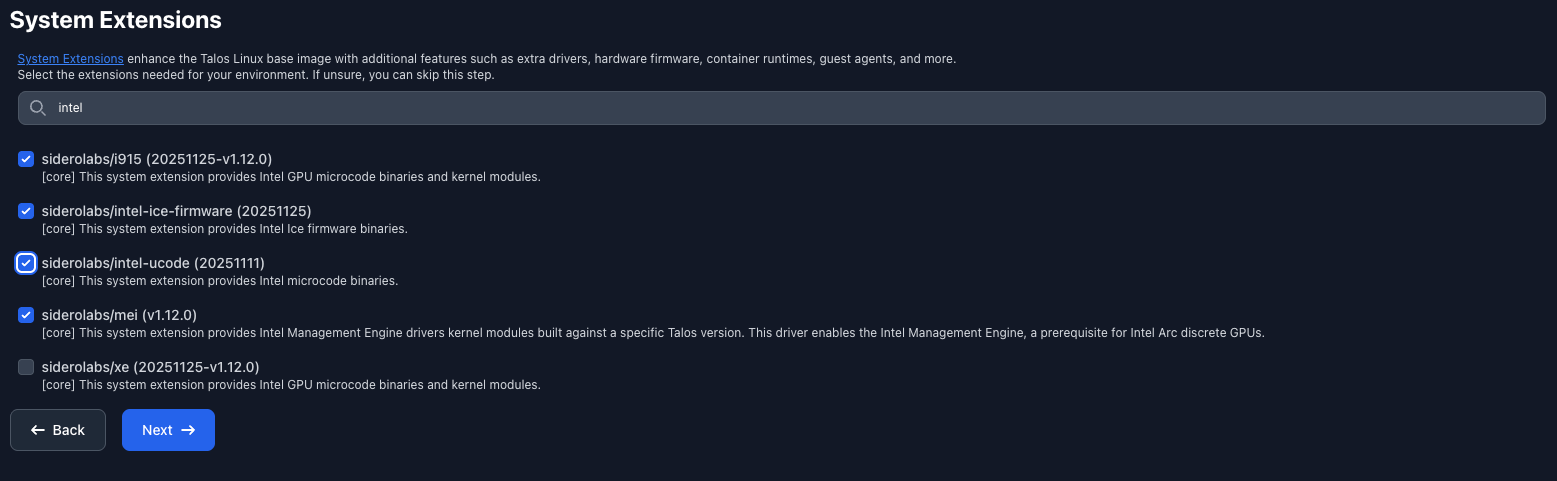
Keep clicking next till you get the Schematic Ready page.
You will most likely land up with a schematic ID of bf2113e1bea48d566f7d1e08eb780f832ccb56bbd7cf2f95769f7a04f9f2b184
Upgrade your nodes with the below
talosctl upgrade -i factory.talos.dev/installer/bf2113e1bea48d566f7d1e08eb780f832ccb56bbd7cf2f95769f7a04f9f2b184:v1.9.5
Using Talhelper
Add the below to your per-node config
# Chopped for brevity
nodes:
  - hostname: rg-talos-1
    ipAddress: 172.16.0.1
    controlPlane: true
    installDisk: /dev/sdb
+   schematic:
+     customization:
+       systemExtensions:
+         officialExtensions:
+           - siderolabs/i915
+           - siderolabs/intel-ice-firmware
+           - siderolabs/intel-ucode
+           - siderolabs/mei
Generate the config
talhelper genconfig
Then apply
talhelper gencommand apply --extra-flags --mode=reboot
Install Node Feature discovery
My config is set up around using Flux, so these instructions will be flux based but can easily be adapted to raw kubectl commands.
I do highly suggest if you’re getting this deep in to Kubernetes, you start looking at flux.
Create the git-repo.yaml
apiVersion: source.toolkit.fluxcd.io/v1
kind: GitRepository
metadata:
  name: node-feature-discovery
  namespace: flux-system
spec:
  interval: 30m
  url: https://github.com/kubernetes-sigs/node-feature-discovery
  ref:
    tag: v0.18.3
Create the namespace.yaml
apiVersion: v1
kind: Namespace
metadata:
  name: node-feature-discovery
  labels:
    pod-security.kubernetes.io/enforce: privileged
    pod-security.kubernetes.io/audit: privileged
    pod-security.kubernetes.io/warn: privileged
Finally create the deployment of node-feature-discovery in a deployment.yaml file
apiVersion: kustomize.toolkit.fluxcd.io/v1
kind: Kustomization
metadata:
  name: sys-node-feature-discovery
  namespace: flux-system
spec:
  interval: 10m
  sourceRef:
    kind: GitRepository
    name: node-feature-discovery
  path: ./deployment/overlays/default
  prune: true
  timeout: 1m
  patches:
    - target:
        kind: Namespace
        name: node-feature-discovery
      patch: |
        apiVersion: v1
        kind: Namespace
        metadata:
          name: node-feature-discovery
        $patch: delete
You’re probably wondering why we’re creating a namespace just to $patch: delete it.
The YAML we are referencing, creates a namespace as part of the kustomization.yaml file,
and it has a habit of breaking the Kustomization at Flux level! The more you know…
Checking for deployments in the node-feature-discovery namespace, we should now see pods in the running state.
➜ k get pods
NAME                          READY   STATUS    RESTARTS       AGE
nfd-gc-65495bf44-pkv2k        1/1     Running   0              8d
nfd-master-778bd7df75-8vv6n   1/1     Running   1 (6d1h ago)   8d
nfd-worker-58nrv              1/1     Running   2 (6d1h ago)   8d
nfd-worker-5n9fn              1/1     Running   6 (8d ago)     8d
nfd-worker-k7f2p              1/1     Running   0              8d
Intel NFD rules
The next part is a set of custom rules that Intel have written for Kubernetes clusters, to expose their GPU resources.
Create a file called git-repo.yaml
# git-repo.yaml
# https://github.com/intel/intel-device-plugins-for-kubernetes/tree/main/deployments/nfd/overlays/node-feature-rules
apiVersion: source.toolkit.fluxcd.io/v1
kind: GitRepository
metadata:
  name: intel-device-plugins-for-kubernetes
  namespace: flux-system
spec:
  interval: 30m
  url: https://github.com/intel/intel-device-plugins-for-kubernetes
  ref:
    tag: v0.34.1
We then can deploy the node-feature-rules using the below yaml, placed in a file called node-feature-rules.yaml
# node-feature-rules.yaml
apiVersion: kustomize.toolkit.fluxcd.io/v1
kind: Kustomization
metadata:
  name: sys-node-feature-discovery-intel-rules
  namespace: flux-system
spec:
  interval: 10m
  dependsOn:
    - name: sys-node-feature-discovery
  targetNamespace: node-feature-discovery
  sourceRef:
    kind: GitRepository
    name: intel-device-plugins-for-kubernetes
  path: ./deployments/nfd/overlays/node-feature-rules
  prune: true
  timeout: 1m
After around 5 minutes you can check if the rules are present
kubectl get nodefeaturerules.nfd.k8s-sigs.io
And you should see 2 rules
➜ kubectl get nodefeaturerules.nfd.k8s-sigs.io
NAME                          AGE
intel-dp-devices              75d
intel-gpu-platform-labeling   75d
Testing the labels have been applied to the nodes
The node feature discovery rules (from intel-device-plugins-for-kubernetes/deployments/nfd/overlays/node-feature-rules /node-feature-rules.yaml)
applies the below label to nodes that have GPU’s in them that intel has picked up
"intel.feature.node.kubernetes.io/gpu": "true"
We can check what nodes have got this label using the below command
kubectl get nodes -l intel.feature.node.kubernetes.io/gpu="true"
If you’re not seeing this command at all, check any labels are being applied
kubectl get nodes/<node name> -o json | jq .metadata.labels
It should return something like
{
  "beta.kubernetes.io/arch": "amd64",
  "beta.kubernetes.io/os": "linux",
  "extensions.talos.dev/i915": "20251021-v1.11.5",
  "extensions.talos.dev/intel-ice-firmware": "20251021",
  "extensions.talos.dev/intel-ucode": "20250812",
  "extensions.talos.dev/iscsi-tools": "v0.2.0",
  "extensions.talos.dev/mei": "v1.11.5",
  "extensions.talos.dev/modules.dep": "6.12.57-talos",
  "feature.node.kubernetes.io/cpu-cpuid.ADX": "true",
  "feature.node.kubernetes.io/cpu-cpuid.AESNI": "true",
  "feature.node.kubernetes.io/cpu-cpuid.AVX": "true",
  "feature.node.kubernetes.io/cpu-cpuid.AVX2": "true",
  "feature.node.kubernetes.io/cpu-cpuid.CMPXCHG8": "true",
  "feature.node.kubernetes.io/cpu-cpuid.FLUSH_L1D": "true",
  "feature.node.kubernetes.io/cpu-cpuid.FMA3": "true",
  "feature.node.kubernetes.io/cpu-cpuid.FXSR": "true",
  "feature.node.kubernetes.io/cpu-cpuid.FXSROPT": "true",
  "feature.node.kubernetes.io/cpu-cpuid.IA32_ARCH_CAP": "true",
  "feature.node.kubernetes.io/cpu-cpuid.IBPB": "true",
  "feature.node.kubernetes.io/cpu-cpuid.LAHF": "true",
  "feature.node.kubernetes.io/cpu-cpuid.MD_CLEAR": "true",
  "feature.node.kubernetes.io/cpu-cpuid.MOVBE": "true",
  "feature.node.kubernetes.io/cpu-cpuid.MPX": "true",
  "feature.node.kubernetes.io/cpu-cpuid.OSXSAVE": "true",
  "feature.node.kubernetes.io/cpu-cpuid.PMU_FIXEDCOUNTER_CYCLES": "true",
  "feature.node.kubernetes.io/cpu-cpuid.PMU_FIXEDCOUNTER_INSTRUCTIONS": "true",
  "feature.node.kubernetes.io/cpu-cpuid.PMU_FIXEDCOUNTER_REFCYCLES": "true",
  "feature.node.kubernetes.io/cpu-cpuid.RTM_ALWAYS_ABORT": "true",
  "feature.node.kubernetes.io/cpu-cpuid.SPEC_CTRL_SSBD": "true",
  "feature.node.kubernetes.io/cpu-cpuid.SRBDS_CTRL": "true",
  "feature.node.kubernetes.io/cpu-cpuid.STIBP": "true",
  "feature.node.kubernetes.io/cpu-cpuid.SYSCALL": "true",
  "feature.node.kubernetes.io/cpu-cpuid.SYSEE": "true",
  "feature.node.kubernetes.io/cpu-cpuid.VMX": "true",
  "feature.node.kubernetes.io/cpu-cpuid.X87": "true",
  "feature.node.kubernetes.io/cpu-cpuid.XGETBV1": "true",
  "feature.node.kubernetes.io/cpu-cpuid.XSAVE": "true",
  "feature.node.kubernetes.io/cpu-cpuid.XSAVEC": "true",
  "feature.node.kubernetes.io/cpu-cpuid.XSAVEOPT": "true",
  "feature.node.kubernetes.io/cpu-cpuid.XSAVES": "true",
  "feature.node.kubernetes.io/cpu-hardware_multithreading": "false",
  "feature.node.kubernetes.io/cpu-model.family": "6",
  "feature.node.kubernetes.io/cpu-model.id": "94",
  "feature.node.kubernetes.io/cpu-model.vendor_id": "Intel",
  "feature.node.kubernetes.io/cpu-pstate.scaling_governor": "performance",
  "feature.node.kubernetes.io/cpu-pstate.status": "active",
  "feature.node.kubernetes.io/cpu-pstate.turbo": "true",
  "feature.node.kubernetes.io/kernel-config.NO_HZ": "true",
  "feature.node.kubernetes.io/kernel-config.NO_HZ_IDLE": "true",
  "feature.node.kubernetes.io/kernel-version.full": "6.12.57-talos",
  "feature.node.kubernetes.io/kernel-version.major": "6",
  "feature.node.kubernetes.io/kernel-version.minor": "12",
  "feature.node.kubernetes.io/kernel-version.revision": "57",
  "feature.node.kubernetes.io/pci-0300_8086.present": "true",
  "feature.node.kubernetes.io/storage-nonrotationaldisk": "true",
  "feature.node.kubernetes.io/system-os_release.ID": "talos",
  "feature.node.kubernetes.io/system-os_release.VERSION_ID": "v1.11.5",
  "gpu.intel.com/device-id.0300-1912.count": "1",
  "gpu.intel.com/device-id.0300-1912.present": "true",
  "intel.feature.node.kubernetes.io/gpu": "true",
  "kubernetes.io/arch": "amd64",
  "kubernetes.io/hostname": "rg-talos-1",
  "kubernetes.io/os": "linux",
  "node-role.kubernetes.io/control-plane": ""
}
We can now see some interesting labels applied to the node!
This now means that the node feature rules have picked the GPU up!
{
  "gpu.intel.com/device-id.0300-1912.count": "1",
  "gpu.intel.com/device-id.0300-1912.present": "true",
  "intel.feature.node.kubernetes.io/gpu": "true"
}
Intel GPU Plugin
Now we’ve got the groundwork setup, we can finally get on to installing the actual package that deals with GPU allocation and translation.
Create another namespace
# inteldeviceplugins-system.yaml
apiVersion: v1
kind: Namespace
metadata:
  name: inteldeviceplugins-system
  labels:
    pod-security.kubernetes.io/enforce: privileged
    pod-security.kubernetes.io/audit: privileged
    pod-security.kubernetes.io/warn: privileged
Now we can deploy the GpiDevicePlugin
apiVersion: deviceplugin.intel.com/v1
kind: GpuDevicePlugin
metadata:
  name: gpudeviceplugin
  namespace: inteldeviceplugins-system
spec:
  image: intel/intel-gpu-plugin:0.34.1
  sharedDevNum: 2
  logLevel: 4
  nodeSelector:
    intel.feature.node.kubernetes.io/gpu: "true"
You can set spec.sharedDevNumber to what ever you want. This defines how many workloads can share the GPU, but does not affect how much
GPU each workload can use when running. If the workload requests 100% of the GPU it will use it.
Once this is applied, we should be able to see nodes with the allocatable resources containing gpu.intel.com/i915
kubectl get node -o 'jsonpath={.items[*].status.allocatable}' | jq
{
  "cpu": "3950m",
  "ephemeral-storage": "113767664656",
  "gpu.intel.com/i915": "10",
  "memory": "7384476Ki",
  "pods": "110",
  "squat.ai/tun": "0"
}
Allowing workloads to use the GPU
We will grant Jellyfin access to the GPU to assist with Transcoding media
NOTE
These GPU’s suck. They are however better than prue CPU transcoding, but they still suck! Don’t expect night and day
To request that a pod get access to the GPU, simply add the resources.limits field and set the value to gpu.intel.com/i915 and an integer relating to how much of the GPU you wish to divide up.
apiVersion: apps/v1
kind: StatefulSet
metadata:
  name: jellyfin
  namespace: media
spec:
  selector:
    matchLabels:
      app: jellyfin
  serviceName: jellyfin
  replicas: 1
  template:
    metadata:
      labels:
        app: jellyfin
    spec:
      containers:
        - name: jellyfin
          image: ghcr.io/jellyfin/jellyfin:10.11.5
+         resources:
+           limits:
+             gpu.intel.com/i915: 10
Closing notes and useful resources
If you have any issues, please feel free to reach out and I will do my best to help!