
Preamble
In running my own clusters at home, deploying all the apps I want, there’s one thing that kept coming up: most apps send notifications via Email. Always email.
Anyone who’s self-hosted, or done any form of sysadmin, knows email is a total pain.
It gets worse in a cluster because apps want credentials for every provider (Gmail, whatever). Doing it this way means even more secrets floating around everywhere.
Also, most ISPs block outbound port 25 which is often used to communicate with your mail server (yes, not all, but most)
So I wanted something simple: one internal mail relay per cluster. Apps just point at it, no credentials, no fuss. That’s what this post is about.
Problem statement
I want a central per-cluster email relay I can use to send emails, with very minimal configuration.
I want to only specify the smtp server and from address - no credentials.
Solution
I’ve come up with a solution that uses the bokysan/docker-postfix image, docker.io/boky/postfix
This is made up of
- Config map
- SES Secrets
- Deployment
- Service
- SES Configured in your AWS Account
- IAM User, with SMTP creds
I am using AWS SES as it’s free, and it’s a reliable SMTP relay that integrates well with Postfix. I used to use SES as my outbound relay when I used to Host my own email server.
SES IAM User
In order to make this work, you will need to have a pre-existing AWS SES configuration set up. That’s out of scope for this post however.
To allow the postfix container to send to SES, we need to create an AWS IAM user, give it permissions to send emails.
resource "aws_iam_user" "smtp_user" {
  name = "kubernetes-postfix-relay"
}

resource "aws_iam_access_key" "smtp_user" {
  user = aws_iam_user.smtp_user.name
}

data "aws_iam_policy_document" "ses_sender" {
  statement {
    actions   = ["ses:SendRawEmail"]
    resources = ["*"]
  }
}

resource "aws_iam_policy" "ses_sender" {
  name        = "ses_sender"
  description = "Allows sending of e-mails via Simple Email Service"
  policy      = data.aws_iam_policy_document.ses_sender.json
}

resource "aws_iam_user_policy_attachment" "test-attach" {
  user       = aws_iam_user.smtp_user.name
  policy_arn = aws_iam_policy.ses_sender.arn
}

output "smtp_username" {
  value = aws_iam_access_key.smtp_user.id
}

output "smtp_password" {
  sensitive = true
  value     = aws_iam_access_key.smtp_user.ses_smtp_password_v4
}

locals {
  aws_creds = jsonencode(
    {
      RELAYHOST_PASSWORD = aws_iam_access_key.smtp_user.ses_smtp_password_v4,
      RELAYHOST_USERNAME = aws_iam_access_key.smtp_user.id
    }
  )
}

output "combined" {
  value     = local.aws_creds
  sensitive = true
}
Plan and apply this Terraform.
Create a secret based off the username and password
kubectl create secret generic aws-ses-credentials \
  --from-literal=RELAYHOST_PASSWORD=<value of RELAYHOST_PASSWORD> \
  --from-literal=RELAYHOST_USERNAME=<value of RELAYHOST_USERNAME>
Config of the container
In order to setup the container, we need to pass it environment variables.
As I am based in the eu region of AWS, it makes sense to use the closest DC, as well as that’s where the config is for SES.
If you do not know the endpoints to use, see AWS: SMTP Endpoints
apiVersion: v1
kind: ConfigMap
metadata:
  name: postfix
  namespace: postfix
data:
  RELAYHOST: "[email-smtp.eu-west-2.amazonaws.com]:587" # Change this to your
  ALLOW_EMPTY_SENDER_DOMAINS: "true"
  POSTFIX_myhostname: "smtp.postfix" # Must match the `service` later. Comprised of `svc.namespace`
Service
The deployment needs to be exposed, and this requires a kubernetes service. Ensure that it’s named the same as POSTFIX_myhostname otherwise you will get errors
We call this service smtp so when we come to consume it, it’s called like smtp.postfix (See example)
apiVersion: v1
kind: Service
metadata:
  name: smtp
  namespace: postfix
spec:
  type: ClusterIP
  selector:
    app: postfix
  ports:
    # The below looks like a duplication, but it's not. The container exposes port `587` and in order to just use SMTP on port 25, we just "re map" it
    - protocol: TCP
      port: 25
      targetPort: 587
      name: smtp
    - protocol: TCP
      port: 587
      targetPort: 587
      name: smtp2
Deployment
This is where the magic happens
apiVersion: apps/v1
kind: Deployment
metadata:
  name: postfix
  namespace: postfix
  annotations:
    reloader.stakater.com/auto: "true"
  labels:
    app: postfix
spec:
  replicas: 1
  selector:
    matchLabels:
      app: postfix
  template:
    metadata:
      name: postfix
      labels:
        app: postfix
    spec:
      containers:
        - name: postfix
          image: docker.io/boky/postfix
          imagePullPolicy: IfNotPresent
          ports:
            - containerPort: 587
              protocol: TCP
          envFrom:
            - secretRef:
                name: aws-ses-credentials
            - configMapRef:
                name: postfix
      restartPolicy: Always
Check the deployment
➜ k get pods
NAME                       READY   STATUS    RESTARTS   AGE
postfix-6fb5845bc4-jg4dw   1/1     Running   0          32s
kubectl logs -f postfix-6fb5845bc4-jg4dw
If you see something similar to the below, you’re good!
➜ kubectl logs -f postfix-6fb5845bc4-jg4dw
★★★★★ POSTFIX STARTING UP (debian) ★★★★★
‣ NOTE  System accounts: postfix=100:102, opendkim=101:104. Careful when switching distros.
‣ INFO  Not setting any timezone for the container
‣ DEBUG /tmp writable.
‣ INFO  Using plain log format for rsyslog.
grep: /etc/logrotate.d/logrotate.conf: No such file or directory
‣ NOTE  Emails in the logs will not be anonymized. Set ANONYMIZE_EMAILS to enable this feature.
‣ DEBUG Reowning root: /var/spool/postfix/
‣ DEBUG Reowning root: /var/spool/postfix/pid/
‣ DEBUG Reowning postfix:postdrop /var/spool/postfix/private/
‣ DEBUG Reowning postfix:postdrop /var/spool/postfix/public/
‣ INFO  Preparing files for Postfix chroot:
cp: '/etc/localtime' and '/var/spool/postfix/etc/localtime' are the same file
        mkdir: created directory '/var/spool/postfix/usr/share'
        mkdir: created directory '/var/spool/postfix/usr/share/zoneinfo'
        Copying /usr/share/zoneinfo -> /var/spool/postfix/usr/share/zoneinfo
        '/etc/localtime' -> '/var/spool/postfix/etc/localtime'
        '/etc/nsswitch.conf' -> '/var/spool/postfix/etc/nsswitch.conf'
        '/etc/resolv.conf' -> '/var/spool/postfix/etc/resolv.conf'
        '/etc/services' -> '/var/spool/postfix/etc/services'
        '/etc/host.conf' -> '/var/spool/postfix/etc/host.conf'
        '/etc/hosts' -> '/var/spool/postfix/etc/hosts'
        '/etc/passwd' -> '/var/spool/postfix/etc/passwd'
‣ NOTE  Switching default_database_type to lmdb to ensure cross-distro compatibility.
‣ WARN  Detected old hash: and btree: references in the config file, which are not supported anymore. Upgrading to lmdb:
‣ DEBUG Creating new postalias for lmdb:/etc/aliases.
‣ DEBUG Creating new postalias for lmdb:/etc/aliases.
‣ INFO  Using unlimited message size.
‣ INFO  Setting smtp_tls_security_level: may
‣ NOTE  Forwarding all emails to [email-smtp.eu-west-2.amazonaws.com]:587 using username <REDACTED MANUALLY> and password (redacted).
‣ INFO  Using default private network list for trusted networks.
‣ INFO  Debugging is disabled.
‣ DEBUG DKIM_AUTOGENERATE not set -- you will need to provide your own keys.
‣ INFO  No DKIM keys found, will not use DKIM.
‣ INFO  Applying custom postfix setting: message_size_limit=0
‣ INFO  Applying custom postfix setting: myhostname=smtp.postfix
‣ INFO  Applying custom postfix setting: mynetworks=127.0.0.0/8,10.0.0.0/8,172.16.0.0/12,192.168.0.0/16
‣ NOTE  Starting: rsyslog, crond, postfix
2026-01-21 01:59:51,027 INFO Set uid to user 0 succeeded
2026-01-21 01:59:51,030 INFO supervisord started with pid 7
2026-01-21 01:59:52,033 INFO spawned: 'cron' with pid 395
2026-01-21 01:59:52,036 INFO spawned: 'opendkim' with pid 396
2026-01-21 01:59:52,040 INFO spawned: 'postfix' with pid 397
2026-01-21 01:59:52,043 INFO spawned: 'rsyslog' with pid 398
2026-01-21T01:59:52.064168+00:00 INFO    rsyslogd: [origin software="rsyslogd" swVersion="8.2302.0" x-pid="398" x-info="https://www.rsyslog.com"] start
2026-01-21 01:59:52,064 INFO success: cron entered RUNNING state, process has stayed up for > than 0 seconds (startsecs)
2026-01-21 01:59:52,064 INFO success: postfix entered RUNNING state, process has stayed up for > than 0 seconds (startsecs)
2026-01-21T01:59:52.989859+00:00 INFO    postfix/postfix-script[1385]: starting the Postfix mail system
2026-01-21T01:59:52.997643+00:00 INFO    postfix/master[1386]: daemon started -- version 3.7.11, configuration /etc/postfix
2026-01-21 01:59:55,000 INFO success: rsyslog entered RUNNING state, process has stayed up for > than 2 seconds (startsecs)
2026-01-21 01:59:58,003 INFO success: opendkim entered RUNNING state, process has stayed up for > than 5 seconds (startsecs)
Test our deployment
In one terminal window, port-forward the smtp port to a random port locally. For example, 2525
kubectl port-forward svc/smtp 2525:25
Open a new window and we can send an email.
telnet localhost 2525
- Type
EHLO breadnet.co.ukthen press enter - Type
MAIL FROM:<[email protected]>then press enter - Type
RCPT TO:<[email protected]> - Type
DATAthen press enter - Type
Subject: Hello from Postfix, then press enter. - Press Enter again.
- Type
Hello from my new relay, then press enter. - Type a full stop
., then press enter.
Example of a successful exchange
➜ telnet localhost 2525
Trying ::1...
Connected to localhost.
Escape character is '^]'.
220 smtp.postfix ESMTP Postfix (Debian/GNU)
ehlo breadnet.co.uk
250-smtp.postfix
250-PIPELINING
250-SIZE
250-VRFY
250-ETRN
250-STARTTLS
250-ENHANCEDSTATUSCODES
250-8BITMIME
250-DSN
250-SMTPUTF8
250 CHUNKING
MAIL FROM:<[email protected]>
250 2.1.0 Ok
RCPT TO:<[email protected]>
250 2.1.5 Ok
DATA
354 End data with <CR><LF>.<CR><LF>
Subject: TEST

Hey! this is a test

.
250 2.0.0 Ok: queued as 375FAE3C4
How to use this in apps?
It’s all good and well having a mail relay server in our cluster - but how do we use it?
This is where the service we created comes in handy. It’s named weirdly, smtp, but when you consider how services work, it’s
fqdn is smtp.postfix which makes sense to my brain… It’s the smtp service running on postfix
If we recall the problem statement from the start
I want a central per-cluster email relay I can use to send emails, with very minimal configuration.
I want to only specify the
smtp serverandfrom address- no credentials.
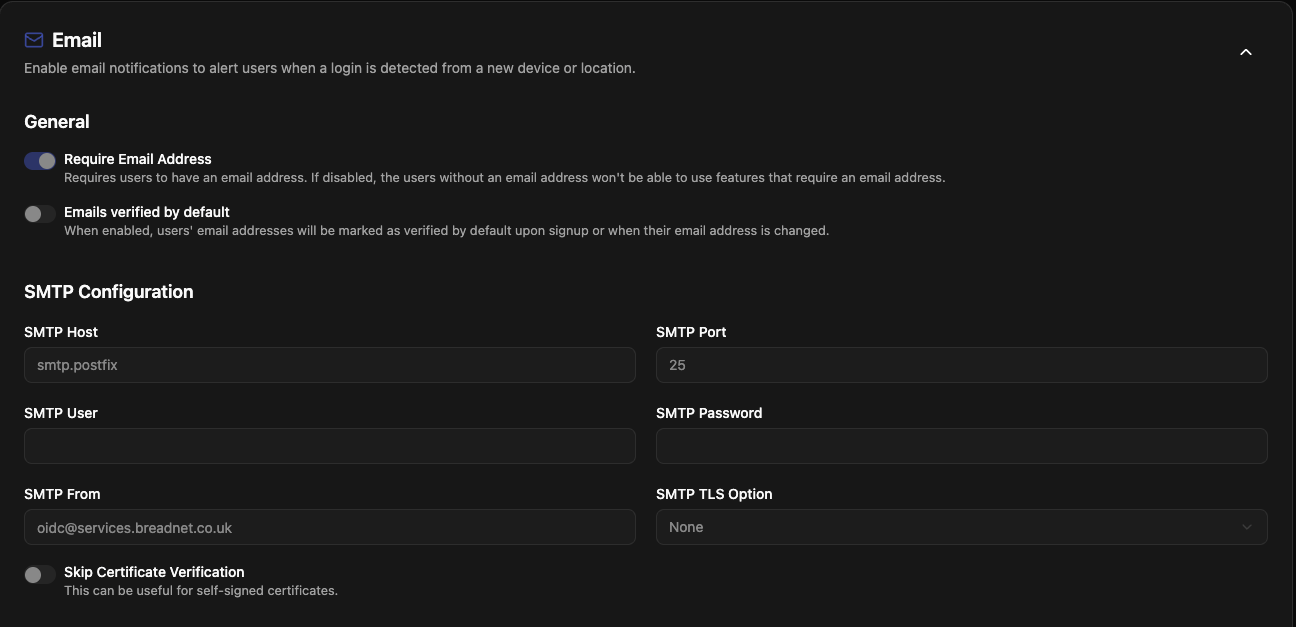
Now all we need to do is specify the name of the SMTP Host, the port and who the email comes from!
Example being in pocket-id
And another example, Mealie
apiVersion: v1
kind: ConfigMap
metadata:
  name: mealie-mail
data:
  SMTP_HOST: "smtp.postfix"
  SMTP_PORT: "587"
  SMTP_FROM_NAME: "Mealie"
  SMTP_AUTH_STRATEGY: "none"
  SMTP_FROM_EMAIL: "[email protected]"
And if you’re still not sold…
An example from nametag
apiVersion: v1
kind: ConfigMap
metadata:
  name: nametag
data:
  EMAIL_DOMAIN: "services.breadinfra.net"
  SMTP_HOST: "smtp.postfix"
  SMTP_PORT: "587"
  SMTP_REQUIRE_TLS: "false"
  SMTP_USER: "[email protected]"
  SMTP_FROM: "[email protected]"
Closing notes
I hope this post provides you with some assistance.
A full example can be found here
If you struggle at all, please reach out to me!